
Referral
Overview
A referral program rewards your existing members for bringing in new customers. When a member's friend joins, the member earns a reward — a voucher, points, or store credit.
Referrals turn your happy customers into a marketing channel.
How it works
- A member copies their referral link from Refer friends in the member app and shares it with a friend.
- The friend signs up through the link and joins your business as a new member.
- The referring member gets the reward straight away — no purchase is needed — and a notification. Each Live program whose Referral Min Count–Referral Max Count range includes the member's number of joined friends pays out.
- A Gift Amount Limit caps how much a program will ever pay out, so your costs stay predictable.
The reward (Rule type on the form) can be:
- Voucher — a voucher copy.
- Program — loyalty points.
- Store Value — a top-up to store credit.
Example: with Referral Min Count
1and Referral Max Count5, a member is rewarded for each of their first five friends who join. The sixth earns nothing from this program — add a second program, say6–10, to keep rewarding.
Referrals need the switch and referral tickets
A referral only counts when Allow Referral is on in Merchant Settings › Programs, and you have referral tickets left. Each friend who joins through a link uses one ticket. With none left, the friend still joins but nobody is rewarded, and members see "Note! Merchant referral program ticket is low" when they copy their link. Your remaining Referral Ticket Count shows in Merchant Settings › Main; buy more under Customers & Loyalty › Marketing › Buy Credits.
The referring member must still be an active member of your business when their friend joins.
Default setup
Bean & Brew example: refer a friend, get $5 store credit.
- Open Merchant Settings (click your merchant name at the top of the sidebar) › Programs and turn on Allow Referral.
- In the sidebar open Customers & Loyalty › Programs › Referral (
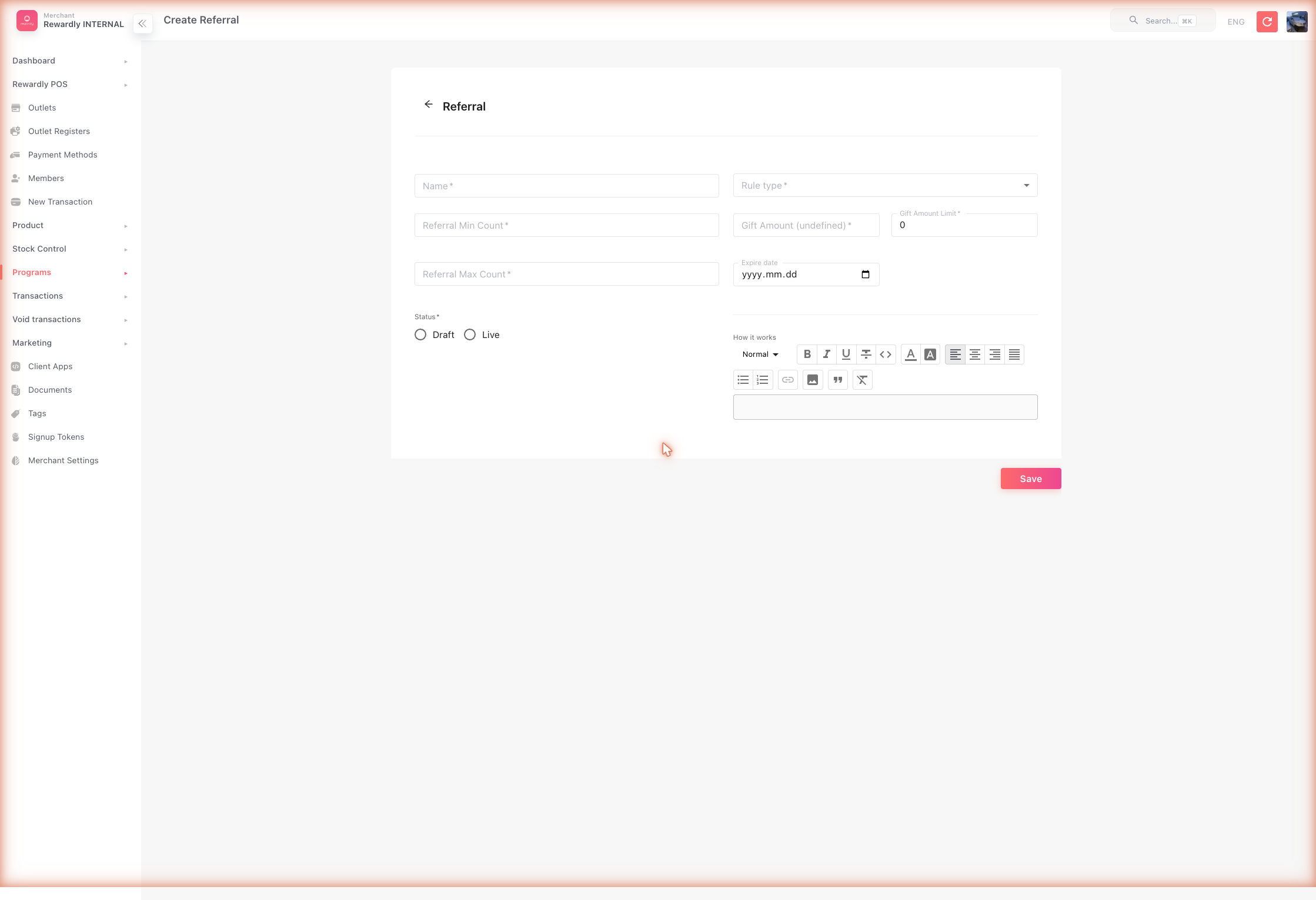
/programsreferral), then click Create. The Create Referral form opens. - Fill in:
- Name —
Refer a Friend - Referral Min Count / Referral Max Count —
1/10, to reward each of a member's first ten friends - Rule type —
Store Value - Gift Amount —
5 - Gift Amount Limit — the total payout cap for the program (
0= no cap)
- Name —
- Set Status to Draft, review, then switch to Live and Save.
Advanced options
All referral fields
| Field | What it does |
|---|---|
| Name | The referral program's name. Required. |
| Referral Min Count / Referral Max Count | The range of referrals the reward applies to. When a friend is the member's 1st, 2nd, 3rd… to join, the member is rewarded if that number falls within the range. Both required. |
| Rule type | The reward — Voucher, Program (points), or Store Value (store credit). |
| Gift Voucher | (Voucher reward) Which voucher the referrer receives. Only LIVE vouchers are listed. |
| Gift Amount | How much the referrer receives — points or credit. With Voucher, it's set to 1: one voucher per referral. |
| Gift Amount Limit | The total the program will pay out before it stops, across all members. Each voucher counts as 1. 0 = no limit. |
| Current Gifted Amount | (When editing) How much has been paid out so far. |
| Expire date | Not saved and not enforced. Whatever you enter here is discarded when you save, and the program keeps running regardless. To stop a referral program, set its Status to Draft. |
| How it works | A rich-text description shown to customers. |
| Status | Draft (inactive) or Live (active). Once Live, the fields lock; set it back to Draft to change them. |
What members & staff see
In the member app, members open Refer friends from their profile to copy and share their referral link. It shows only while Allow Referral is on and the member holds a membership tier. The page lists their invited friends with what each one earned them, and points or credit rewards land in their balance while voucher rewards land in their vouchers. See Refer friends.
There is no POS step — referral rewards are granted automatically once a referral qualifies. Each referral that counted is listed in the admin under Sales › Transactions › Referral, with the gift it paid — 0 when no program paid out.
Related
- Vouchers, Loyalty Points, Store Credit — the possible referral rewards.
- Merchant Settings — the Allow Referral master switch.
- Marketing — buying referral tickets.