
Ingredients & Recipes
Overview
The recipe model tracks the raw materials you use, not the finished items. When you sell a latte, Rewardly subtracts the beans and milk it used — not "one latte".
This is the right choice for cafés, restaurants, and bars. For packaged goods you sell as-is, use Inventory instead.
How it works
Three pieces work together:
| Piece | What it is |
|---|---|
| Ingredients | Your raw materials — beans, milk, cups, syrup. |
| Ingredient Bundles | A recipe — the list of ingredients (and amounts) that make one product. |
| Ingredient Inventories | The stock count of each ingredient, per outlet. |
When a product with a recipe is sold, each ingredient in its bundle is reduced by the recipe amount.
Ingredient stock changes are written through a shared movement model. The current stock count and the transaction ledger are updated together, so a stock-take, manual transaction, or received stock order all follow the same rules. See Ingredient Stock Architecture.
Default setup
Bean & Brew example: track beans and milk so a sold latte depletes both.
1. Create your ingredients
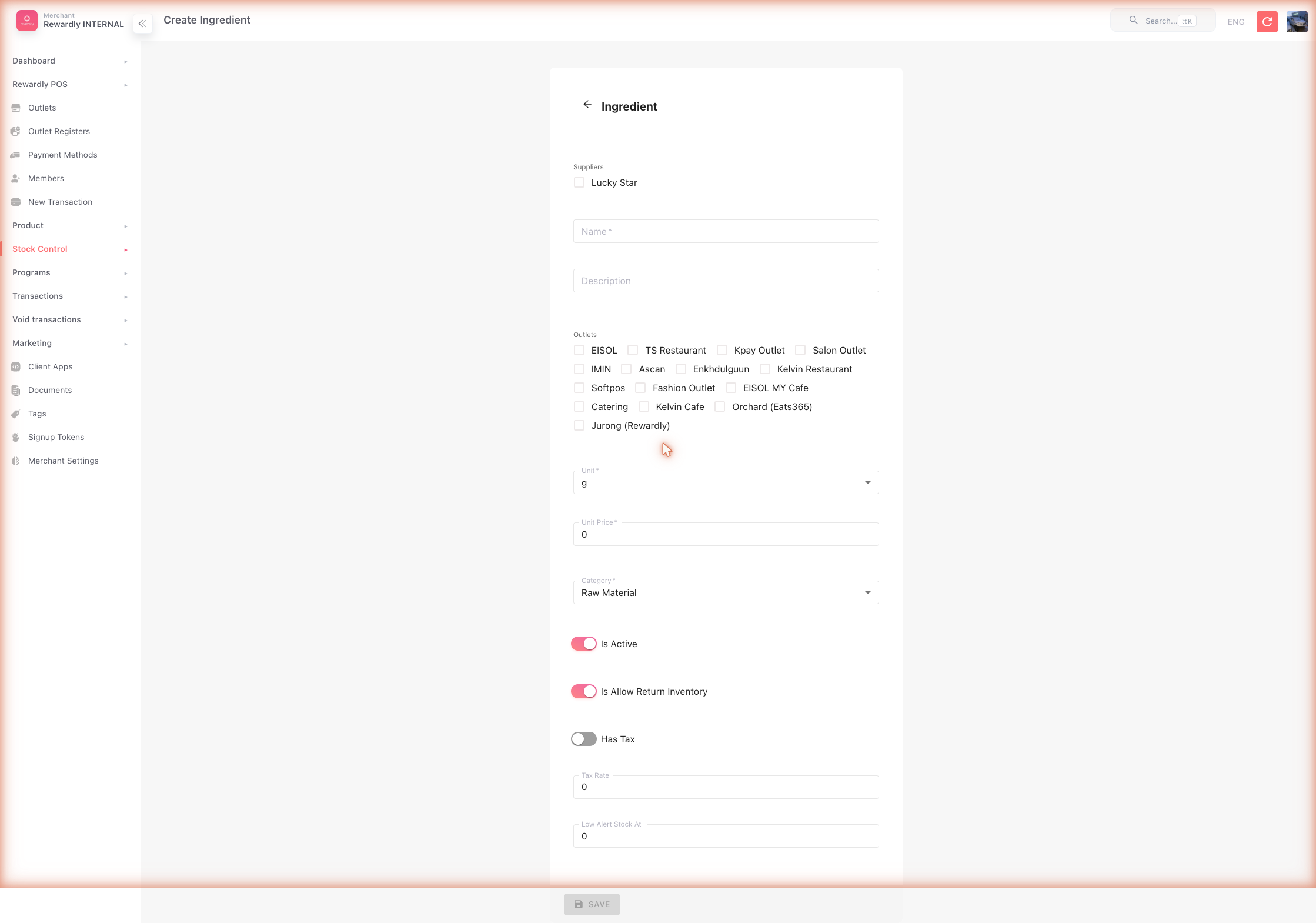
In Stock Control → Ingredient (/ingredients), click Create for each raw material:
- Name — e.g.
Coffee Beans - Suppliers — who supplies it (pick at least one — see Suppliers)
- Outlets — which branches stock it
- Unit —
g,kg,ml,l,pcs, and so on - Unit price — your cost per unit
- Category — Raw Material, Packaging, Seasoning, or Other
2. Create a recipe (Ingredient Bundle)
In Stock Control → Ingredient Bundle (/ingredient-bundles), click Create:
- Name — e.g.
Latte Recipe - Ingredient items — add a row per ingredient with the quantity used (e.g.
Coffee Beans — 18,Milk — 200)
Then use Assign Products on the bundle to link the recipe to the Latte product, and tick Track for it. Or open the product and, in its Ingredients panel, turn on Track ingredients and add the bundle. A product with a recipe but tracking off deducts nothing.
3. Set your starting stock
In Stock Control → Ingredient Inventory (/ingredient-inventories), set the current stock of each ingredient at each outlet.
After an ingredient inventory row is created, the outlet and ingredient are locked on that row. To correct stock, update current stock; Rewardly records the change as an inventory-count transaction.
If a sale deducts an ingredient at an outlet that has no inventory row for it yet, Rewardly creates the row at a negative count.
Advanced options
| Field / feature | What it does |
|---|---|
| Low Alert Stock At | A threshold on an ingredient. At or below it, the ingredient shows a red Low Stock badge on the POS Inventory tab. No notification is sent. (This is the only low-stock alert in Rewardly.) |
| Has tax / Tax rate | Records tax on the ingredient's cost. |
| On Void | Chooses what happens to the ingredient stock when a sale is voided — Add back to stock returns it, Add to wastage leaves it deducted but records it as waste, Do nothing leaves it deducted with no record. Required on every ingredient; defaults to Add back to stock. |
| Bulk outlet assignment | Add or remove outlets across many ingredients at once. |
| CSV export / Smart Import | Export the ingredient list, or bulk-upload from a spreadsheet. |
Related
- Suppliers & Purchasing — restocking ingredients.
- Ingredient Stock Architecture — how inventory counts and ledger entries stay aligned.
- Inventory — the unit model alternative.
- Stock Reports — ingredient stock history.