
Loyalty Points
Prerequisite — create a Membership tier first
The Loyalty program form requires you to choose a membership tier. You cannot save a loyalty program until at least one tier exists.
If you haven't made a tier yet, create one first.
Overview
Loyalty points are what members earn every time they spend with you. You decide the earn rate; Rewardly does the maths automatically on every sale.
Points are flexible — members can pay with them, convert them to store credit, or spend them on vouchers.
How it works
Earning points
A loyalty program belongs to one membership tier. Members in that tier earn points at that program's rate.
The earn rate is the Ratio. The maths is amount spent ÷ ratio = points earned:
Ratio Result 11 point per $1 spent 101 point per $10 spent 1001 point per $100 spent An individual product can override the rate with its own Loyalty Ratio (see Products).
Bonus multipliers can boost earning — a birthday-month multiplier and date-range promotions — plus a one-time bonus for completing a profile. These are set in Merchant Settings.
Points are calculated after payment, by Rewardly's server. The POS never shows "points earned" on screen — the member sees them in their app afterward.
What a point is worth
Each point has a fixed cash value, the Point → Currency value, set once in Merchant Settings. For example, 1 point = $0.01 means 100 points are worth $1.
Redeeming points
Members can use points in three ways:
- Pay with points at the POS — points work as a payment method (see At the Counter).
- Convert to store credit — using a conversion rate you define.
- Buy vouchers — a voucher can carry a price in points.
Redeeming requires Allow redeem loyalty to be on in Merchant Settings.
Redemption limits (Loyalty Conditions)
Left unchecked, a customer could cover almost a whole bill with points. Loyalty Conditions let you cap how many points a customer may redeem on an order, scaled to the order's size.
Where the cap applies
Loyalty Conditions are checked when a customer pays with points at online or QR checkout and on the kiosk. The POS doesn't check them: there, staff can redeem up to the member's points balance.
Each Loyalty Condition is one rule with two fields:
| Field | What it means |
|---|---|
| Minimum Total Amount | The order total (in your currency) a customer must reach before they may redeem more than this rule's Maximum Loyalty Points. Below that total, redemption is capped at Maximum Loyalty Points. |
| Maximum Loyalty Points | The most points a customer may redeem while the order total is still below that Minimum Total Amount. |
Create several conditions to build a tiered table — for example:
| Minimum Total Amount | Maximum Loyalty Points |
|---|---|
20 | 50 |
50 | 100 |
100 | 250 |
With these rules, a $60 order lets the customer redeem at most 250 points — it has already reached the 20 and 50 amounts, so only the 100 row still limits it, and that row caps redemption at 250 points.
Read each row as a ceiling for smaller orders
A row limits orders below its Minimum Total Amount to its Maximum Loyalty Points. So to cap a $60 order at 100 points, the rows would need to be 20 / 25, 50 / 50 and 100 / 100.
To set them up, open Customers & Loyalty → Programs → Loyalty Conditions (/loyalty-conditions) and add one entry per spend band.
Active vs Inactive points
Earned points can be released gradually rather than all at once. Points not yet available are Inactive; once available they become Active and can be spent. Members see both totals in their app.
Expiry
Points can expire after a set number of days — either from the program's Validity in days, or from the platform-wide Point validity in Merchant Settings.
Default setup
Bean & Brew example: a program called Beans Rewards — earn 1 Bean per $1 spent — linked to the Member tier. This is Step 6 of First-Time Setup.
- First, make sure a Membership tier exists.
- In the sidebar open Customers & Loyalty → Programs → Loyalty Programs (
/programsloyalty), then click Create. - Fill in:
- Name —
Beans Rewards - Membership —
Member(required) - Ratio —
1(the form shows1 = 1 Bean) - Portion Count —
1 - Portion Interval Days —
0
- Name —
- Leave Outlets empty so it applies everywhere.
- Set Status to Draft while you review, then change it to Live and Save.
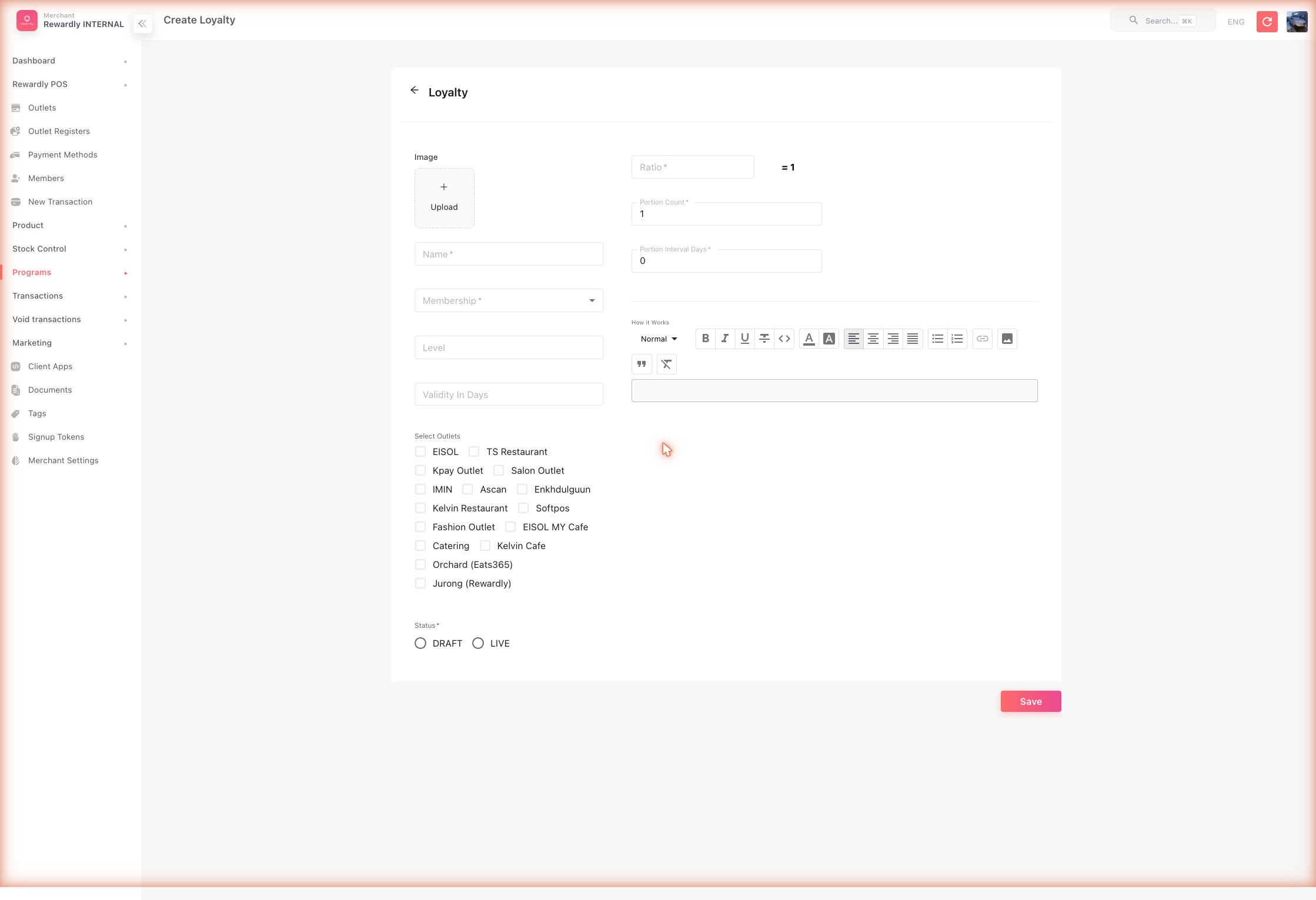
Draft earns nothing
A loyalty program only earns points once its Status is Live. Once Live, its fields lock — finish editing in Draft first.
Advanced options
A separate program per tier
Each loyalty program is tied to one tier. To make higher tiers earn faster, create one program per tier with a different ratio:
| Program | Tier | Ratio | Effect |
|---|---|---|---|
| Silver Rewards | Silver | 2 | 1 point per $2 |
| Gold Rewards | Gold | 1 | 1 point per $1 (twice as fast) |
All loyalty program fields
| Field | What it does |
|---|---|
| Name | The program name. Required. |
| Membership | The tier this program earns for. Required. |
| Ratio | The earn rate (amount ÷ ratio = points). Required. |
| Level | An optional ordering number for the program. |
| Validity in days | Points earned from this program expire after this many days. |
| Outlets | Limit earning to specific outlets. Leave empty to apply everywhere. |
| Portion Count | Splits each earning into this many portions, released over time. 1 = released all at once. |
| Portion Interval Days | Days between portion releases. 0 = immediate. |
| Image | An image for the program. |
| How it works | A rich-text description shown to customers. |
| Status | Draft (inactive) or Live (active). |
Boosting earn rates
These platform-wide settings (in Merchant Settings → Programs tab) increase how fast members earn:
- Birthday Month Point Bonus — a multiplier applied during a member's birth month.
- Date Range Point Bonus — multipliers for specific promotional date ranges.
- Bonus Point On Completing Profile — a one-time award when a member fills in their profile.
- Per-product ratio — any product can earn at its own rate.
What members & staff see
At the POS, points are a payment method. Choosing Loyalty opens the Loyalty modal, which shows "Your Loyalty: <balance>" and the conversion line "1$ = N point", and caps the amount to the member's balance.
In the member app, the Point modal splits the balance into:
- Active — points that can be spent now.
- Inactive — points awarded but not yet available, with a "will be available on …" date.
A transactions list shows each earn and spend with its expiry date. If you enable Allow redeem loyalty at Customer, members can redeem points themselves — the app generates a QR code that your POS staff scan to apply the redemption.
Related
- Membership & Tiers — the required partner of every loyalty program.
- Store Credit — points can be converted into store credit.
- Vouchers — points can be spent to buy vouchers.
- Merchant Settings — point unit, cash value, multipliers, redeem channels.
- At the Counter — redeeming points during a sale.