
Cashback
Overview
Cashback returns a portion of a customer's spending to them — but later, as store credit they can spend on a future visit. Where a discount saves the customer money now, cashback gives them a reason to come back.
Cashback is the twin of Discounts
Cashback and Discounts are built on the same engine. They even share the same form fields. The only real difference is the Discount type setting — cashback returns value later instead of taking it off the current bill.
How it works
- A customer makes a purchase.
- Rewardly calculates the cashback — a percentage or fixed amount of the bill.
- That value is added to the customer's store credit balance.
- The customer spends it on a later visit, before it expires.
Cashback rule types
Just like discounts, cashback has three rule types:
| Rule type | What it returns |
|---|---|
| Rule | A percentage of the whole bill. |
| Amount | A fixed amount per qualifying sale. |
| Product | A percentage of specific products, categories, or tags. |
Cashback usually needs a membership
Cashback is typically given to members. Linking a cashback program to a membership tier is the normal way to make it a tier perk — for example, Gold members get 5% back.
Default setup
Bean & Brew example: 5% back as store credit on every purchase.
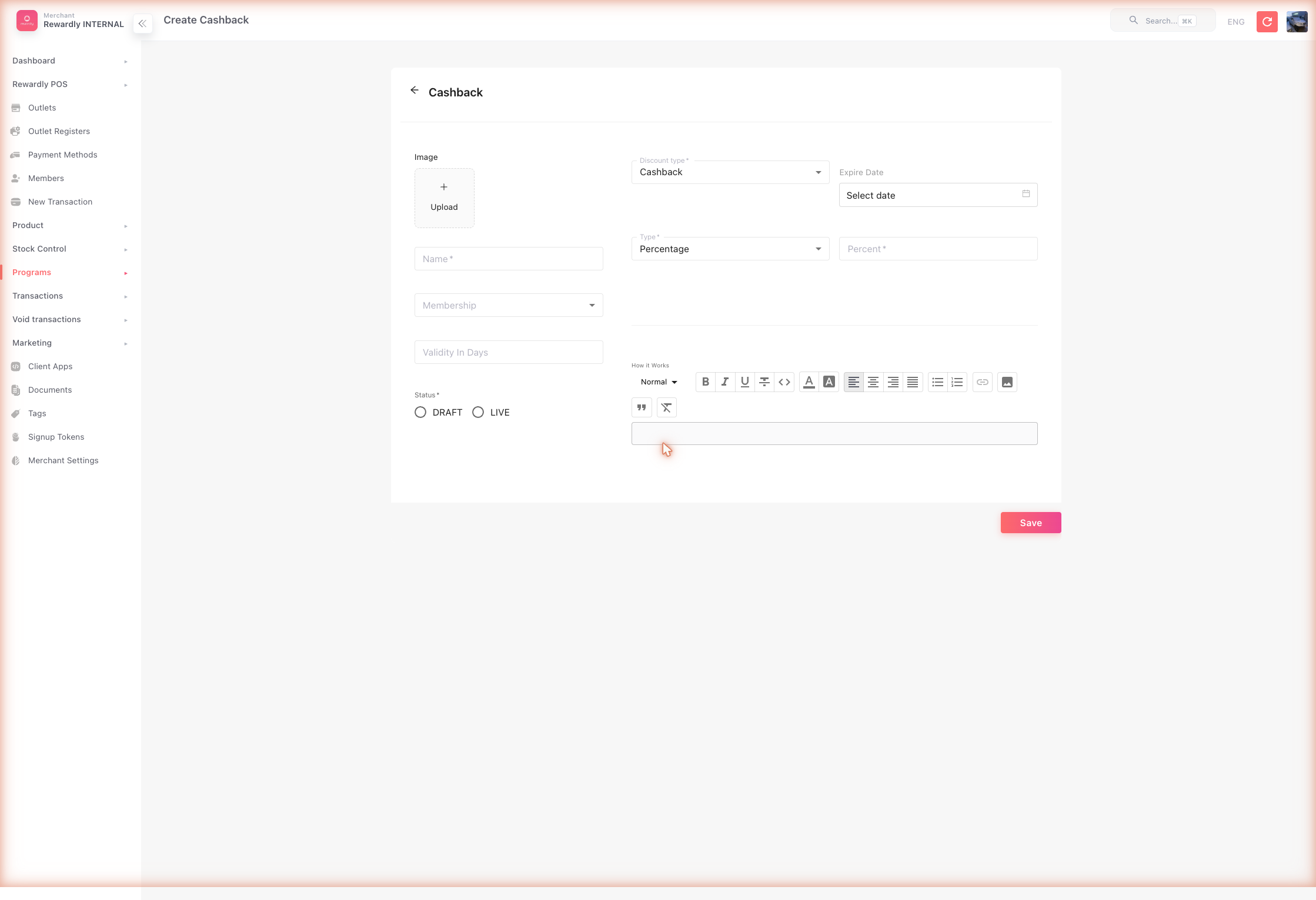
- In the sidebar open Customers & Loyalty → Programs → Cashback Programs (
/programsCashback), then click Create. - Fill in the basics:
- Name —
5% Cashback - Membership — choose a tier if you want to limit it to members (recommended)
- Validity in days — how long the returned credit stays usable (e.g.
60)
- Name —
- In the cashback rules:
- Discount type —
Cashback - Rule type —
Rule(whole bill) - Percent —
5
- Discount type —
- Set Status to Draft, review, then switch to Live and Save.
Advanced options
All cashback fields
| Field | What it does |
|---|---|
| Name | The cashback program's name. Required. |
| Image | A picture for the program. |
| Membership | Restrict cashback to one membership tier. |
| Validity in days | How long the returned store credit stays usable. |
| How it works | A rich-text description shown to customers. |
| Discount type | Fixed to Cashback for this program. |
| Rule type | Whole bill (Rule), fixed amount (Amount), or specific products (Product). |
| Percent | The percentage returned (Rule and Product types). |
| Amount | The fixed amount returned (Amount type). |
| Rule products | (Product type) Which products, categories, or tags earn cashback. |
| Expiry date | A fixed end date for the cashback program. |
| Status | Draft (inactive) or Live (active). |
What members & staff see
Cashback is invisible at the moment of sale — nothing changes on the current bill. After payment, the cashback amount lands in the customer's store credit balance.
In the member app, the customer sees their store credit go up, with the new entry in the Collect tab of their credit history.
Related
- Discounts — the same engine, applied to the current bill instead.
- Store Credit — where cashback value is delivered.
- Membership & Tiers — cashback is commonly a tier perk.