
Order Management
Overview
Order Management is the admin console where you see every order — from the POS, online ordering, the kiosk, and delivery aggregators — all in one place. It's where you check what's happening and handle refunds, voids, and cancellations.
How it works
Order Management is a monitoring console, not a setup screen — there's nothing to configure. Orders arrive here automatically as they're placed.
Using it
The order list
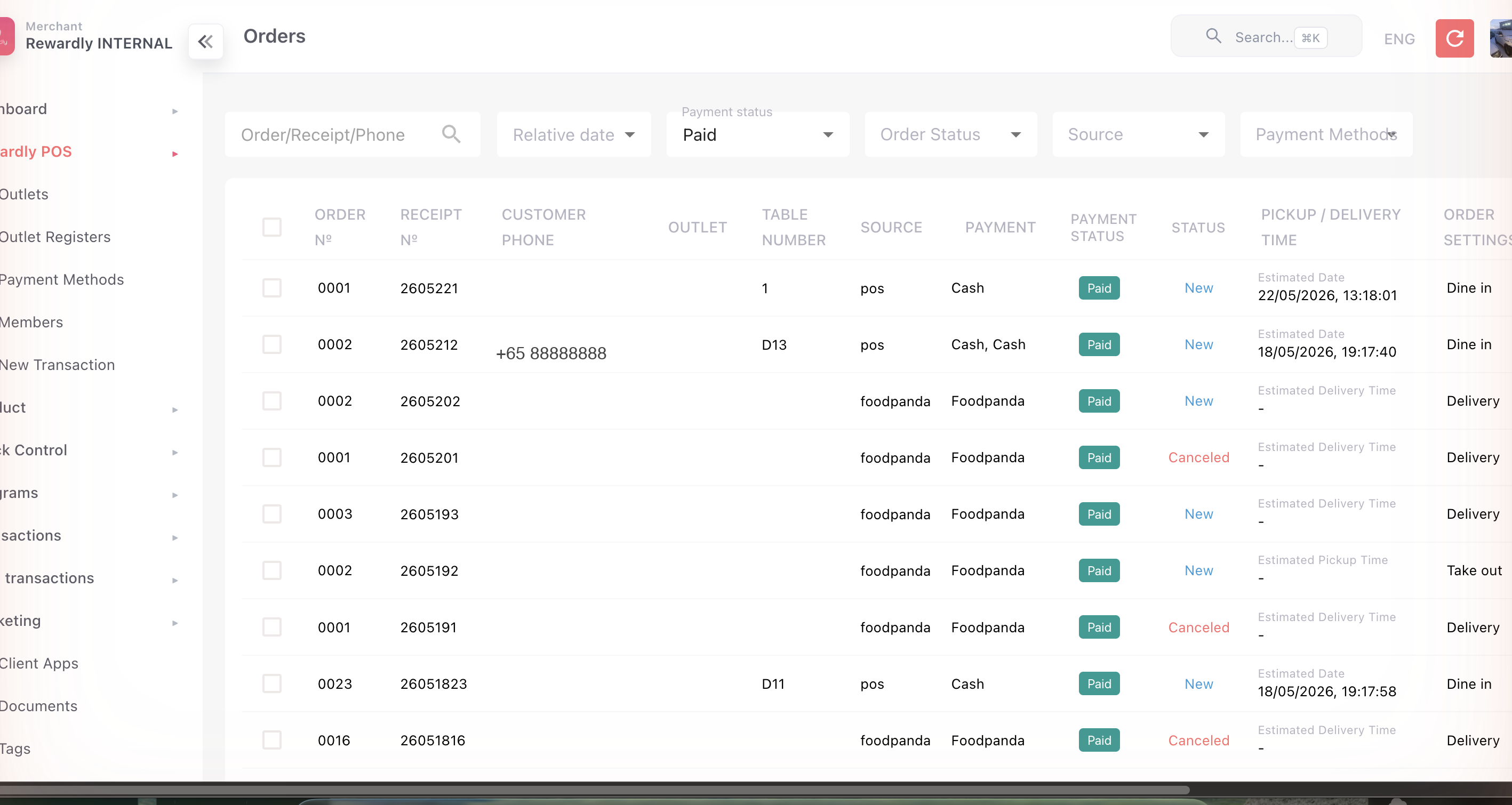
In the sidebar open Orders, under Sales (/orders). The list shows every order with its:
- order and receipt number, customer phone, outlet, table number
- source (POS, online, kiosk, aggregator) and payment method
- payment status — Paid, Pending, Partially Paid, Refunded, Cancelled
- order status, pickup/delivery time, mode, and amount
- Created at and Updated at, to the second
Orders are listed newest first, and the list opens with Payment status: Paid — clear it to see refunded, cancelled or unpaid orders. Every order stays here after its shift closes; orders are never deleted.
To list only cancelled orders, clear Payment status and set Order Status to CANCELED. Don't use Payment status Canceled for this: a cancelled order keeps the payment status it had — Pending if it was never paid, Refunded if the money went back, or Paid if its payment was locked and kept.
To find an order:
- Search (Order/Receipt/Phone) — a receipt number or the customer's phone number. To search by order number, type exactly 4 digits (order 42 is
0042); order numbers start again every day, so pair it with a date. - Relative date — Today, Yesterday, This Week, This Month, Last Week, Last Month.
- Add filter → From / To — a date and time of day, so you can cover a single evening or a night that runs past midnight.
- Payment status, Order Status, Source and Payment Methods filters, plus Outlet and Outlet Register under Add filter.
Date filters match when the order was created, not when it was paid — a tab opened before midnight and paid after it is listed under the day it opened. The admin shows every date and time in Singapore time (GMT+8).
You can also export to CSV (up to a three-month range) with a full item, modifier, and combo breakdown plus a sales summary.
Order detail
Open any order to see its Created At and Updated At times, the outlet, the Employee (the staff login that took the most recent payment, or opened the order if it's unpaid), the source, the customer, every item, and each payment with its time. A line removed before payment shows as Quantity: 0.
The action on the page is VOID, which cancels the order after you confirm. To refund a paid order, use Refund on the POS — see Orders, Refunds & Voids.
To check a disputed order from an earlier shift — including when each round of a table order was sent — see A customer disputes an order after the shift closed.
Carts and pre-orders
- Carts — baskets customers started but didn't complete, useful for spotting drop-off.
- Pre-orders — orders placed for a future date; each can be sent through when it's due.
New Transaction
New Transaction is a manual sale entry screen, found under Sales in the sidebar. Use it to record a sale that wasn't rung up on a register — for example a phone or off-floor sale — and to attach loyalty to it so the member is still credited.
Open New Transaction, enter the sale, and pick the member to credit. The transaction is logged just like a register sale, and the member earns loyalty on it.
Permissions
Whether New Transaction shows in the menu is controlled by the newTransaction permission, but recording the sale itself is governed by the sale resource permission — a role needs sale access for the screen to actually work. Both are set in the roles and permissions matrix.
Related
- Point of Sale · Online Ordering · Delivery — the sources of orders.
- Payment Reports — money taken, by tender.
- Roles and Permissions — gating the New Transaction screen.