
Packages
Overview
A package is a bundle of rewards handed out together in one go. A single package can contain store credit, loyalty points, and vouchers — all delivered at the same moment.
Packages are how you build a welcome gift for new members, or a generous reward for completing a stamp card.
How it works
What's inside a package
A package can contain any combination of:
- Store credit — a fixed amount added to the customer's balance.
- Loyalty points — a fixed number of points.
- Vouchers — one or more voucher copies.
How a package is given out
A package isn't applied at the till like a discount. Instead, you attach it to a trigger, and Rewardly delivers the whole bundle when that trigger fires:
| Trigger | Where you attach the package |
|---|---|
| Joining a membership tier | The tier's Gift program field — see Membership. |
| Completing a stamp card | A stamp-card challenge with Gift type = Package — see Stamp Cards. |
When the trigger fires, the customer instantly receives everything in the package.
Default setup
Bean & Brew example: a "Welcome Pack" for new members —
$5store credit +100Beans + a free-coffee voucher — given automatically when a customer joins.
Build the voucher first
If your package includes a voucher, create that voucher program first so you can select it below.
- In the sidebar open Customers & Loyalty → Programs → Package Programs (
/programspackage), then click Create. - Fill in the basics:
- Name —
Welcome Pack
- Name —
- Set the package contents:
- Gift store value amount —
5 - Gift program amount (points) —
100 - Gift vouchers — add your free-coffee voucher
- Gift store value amount —
- Set Status to Draft, review, then switch to Live and Save.
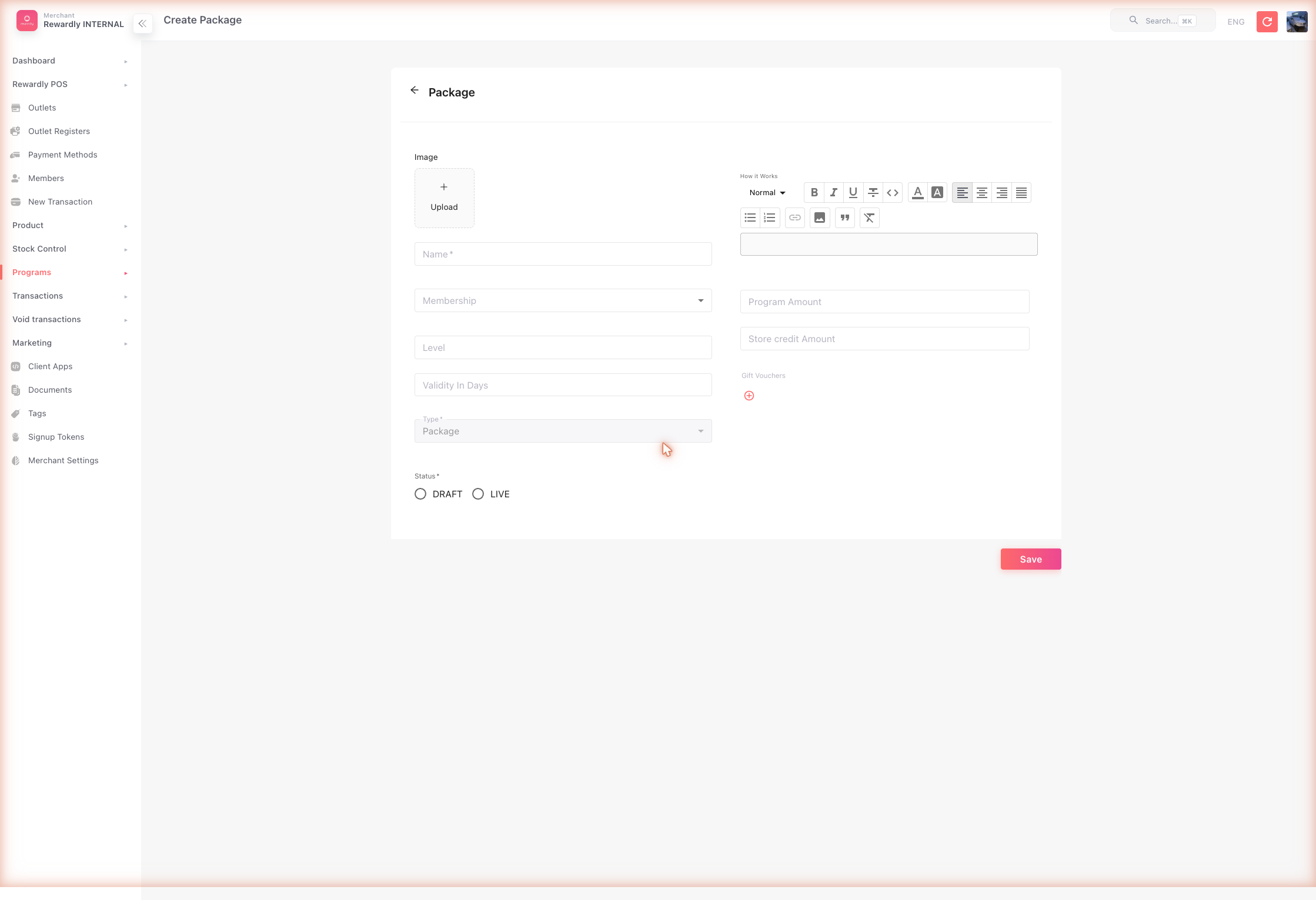 Now attach it to a trigger. To make it a welcome gift:
- Open Customers & Loyalty → Programs → Memberships and edit your Member tier.
- Set its Gift program field to Welcome Pack and Save.
Every new member now receives the Welcome Pack automatically.
Advanced options
All package fields
| Field | What it does |
|---|---|
| Name | The package's name. Required. |
| Image | A picture for the package. |
| Membership | Associate the package with a membership tier. |
| Level | An optional ordering number. |
| Validity in days | How long the package's contents stay valid. |
| Gift store value amount | Store credit included in the package. |
| Gift program amount | Loyalty points included in the package. |
| Gift vouchers | One or more voucher programs included in the package. |
| How it works | A rich-text description shown to customers. |
| Status | Draft (inactive) or Live (active). |
What members & staff see
A package has no POS step — staff do nothing. When the trigger fires (a member joins a tier, or fills a stamp card), the customer simply sees the rewards appear: store credit added, points added, and any vouchers in their voucher list.
Related
- Membership & Tiers — attach a package as a tier welcome gift.
- Stamp Cards — award a package when a card is completed.
- Store Credit, Loyalty Points, Vouchers — the rewards a package bundles.